
Chrome MySQL Admin: Powerful Database Management Tool
Overview
Chrome MySQL Admin is a desktop application designed to provide a graphical user interface (GUI) for managing MySQL servers. It serves as a robust alternative to web-based tools like phpMyAdmin and desktop clients such as Sequel Pro. The software enables users to connect to MySQL servers (version 4.1 or later) and perform a wide range of administrative tasks directly through an intuitive interface. Its primary purpose is to simplify database management for developers, system administrators, and IT professionals who require reliable access to MySQL instances.
The application supports secure connections via SSL and SSH2 port forwarding, making it suitable for environments where data privacy and network security are critical. It allows users to monitor server statistics, manage table structures, execute queries, and visualize database relationships through automated ER-Diagrams. These capabilities make it ideal for routine database maintenance, schema design, data manipulation, and troubleshooting. The tool is particularly useful in development workflows, production support, and database migration projects.
The developer did not provide additional background information. However, the software's open-source nature—evident from its publicly available source code on GitHub—suggests a community-driven development model. This transparency may appeal to users who value code scrutiny and customization. The application is built for Windows and Mac platforms, indicating broad accessibility for desktop users across operating systems.
Key Features & Capabilities
- Secure Server Connections – Supports SSL encryption and SSH2 port forwarding for protected access to remote MySQL servers, ensuring data integrity during transmission.
- Real-Time Server Monitoring – Automatically refreshes server statistics and process lists, allowing users to track performance and active connections in real time.
- Comprehensive Table Management – Enables creation, deletion, and structural editing of tables, including adding and removing columns, indexes, and foreign keys.
- Query Execution & History – Offers a dedicated query editor with support for multiple statements, delimiters, and execution via keyboard shortcuts (Ctrl+Enter), along with a built-in history tracker.
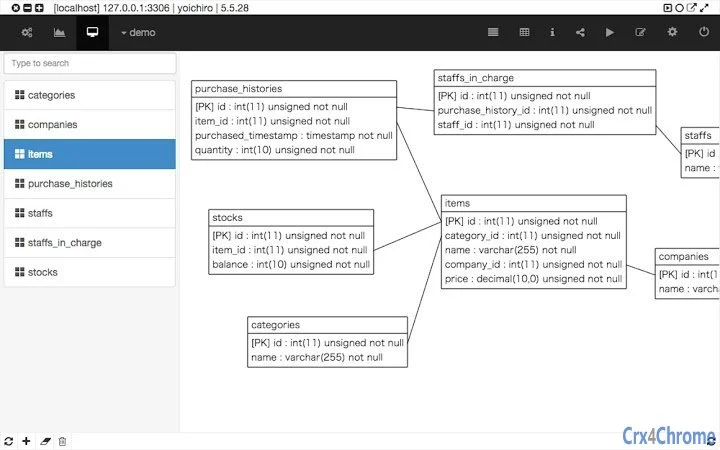
- ER-Diagram Generation – Automatically draws entity-relationship diagrams from existing database schemas, with options to customize display and save diagrams locally.
- Data Manipulation Tools – Supports inserting, updating, and deleting rows with inline editing, row copying, and CSV export functionality.
- Stored Routines Management – Allows creation, editing, and execution of stored procedures and functions directly within the interface.
- Database Export & Backup – Provides the ability to export all databases, facilitating data backup and migration between environments.
- Advanced Search & Filtering – Includes tools to search across multiple columns and tables, with partial matching and row filtering options.
- Configurable Preferences – Offers settings to adjust refresh intervals, query wrap modes, window behavior, and display preferences for a personalized experience.
These features collectively support efficient database administration, from routine data operations to complex schema design. For example, a developer can use the ER-Diagram feature to visualize relationships before deploying a new application, while an administrator might leverage the query history and real-time monitoring to diagnose performance bottlenecks.
User Interface, Workflow & Performance
The user interface of Chrome MySQL Admin follows a modern, flat design with a clean layout divided into functional panels. The left sidebar displays a hierarchical view of databases, tables, and relationships, while the central area presents table data, query results, and structural details. Navigation is intuitive, with clearly labeled buttons and contextual menus that streamline common tasks.
Workflow efficiency is enhanced by keyboard shortcuts, such as F5 for refreshing panels and Ctrl+Enter to execute queries. The ability to pin grid views and maintain window states between sessions improves productivity during extended work sessions. The application also supports drag-and-drop file loading into the query editor, which simplifies importing SQL scripts.
Performance observations are based on general software behavior patterns. The developer did not specify resource usage details. However, with a file size of 4.5 MB, the application is lightweight and likely to run efficiently on standard desktop hardware. Stability appears consistent, given the long development history and regular updates. The use of modern web technologies suggests smooth rendering and responsive interactions, though actual performance may vary depending on the database size and network conditions.
Compatibility & System Requirements
Chrome MySQL Admin is compatible with Windows and Mac operating systems. The software is distributed as a desktop application, indicating it is designed to run natively on these platforms without requiring additional runtime environments. The installation size is 4.5 MB, making it a compact tool suitable for systems with limited storage.
Exact system requirements were not listed. The developer did not provide information about minimum CPU, RAM, or disk space specifications. Compatibility with specific versions of Windows or macOS is also not specified. However, given its release date and continued updates, it is likely to function on current and recent versions of both operating systems. Users should ensure their system supports the underlying technologies used in the application, such as modern web APIs and JavaScript execution environments.
Pros and Cons
Pros
- Lightweight at just 4.5 MB, ideal for low-resource environments.
- Open-source code available on GitHub for transparency and customization.
- Supports secure connections via SSL and SSH2 port forwarding.
- Offers advanced features like automated ER-Diagram generation and stored routine management.
- Intuitive UI with efficient keyboard shortcuts and persistent window states.
- Free to download and use, with no licensing restrictions.
Cons
- Exact system requirements were not provided, limiting pre-installation planning.
- No official support channels or documentation were referenced.
- Performance under heavy database loads was not specified.
- Interface may feel dated compared to modern database clients.
- Limited information on update frequency beyond the version history.
FAQ Section
Is Chrome MySQL Admin available for Windows and Mac?
Yes, the software is compatible with both Windows and Mac operating systems, as confirmed by the developer.
Can I use this tool to connect to remote MySQL servers securely?
Yes, Chrome MySQL Admin supports secure connections using SSL and SSH2 port forwarding, enabling encrypted access to remote databases.
Is the software free to use?
Yes, the application is free to download and use with no cost or licensing fees.
Does the tool support exporting databases?
Yes, it includes the ability to export all databases, which is useful for backup and migration purposes.
Is Chrome MySQL Admin safe to download and install?
The software is open-source, with its code hosted on GitHub. Users can review the source for security verification. However, always download from official or trusted sources.
Final Thoughts & CTA
Chrome MySQL Admin delivers a powerful, no-cost solution for MySQL database administration, combining essential features with a lightweight footprint. Its support for secure connections, real-time monitoring, and automated ER-Diagram generation makes it a valuable tool for developers and administrators alike. While system requirements and official documentation are limited, the open-source nature and consistent update history offer reassurance.
For professionals managing MySQL databases on Windows or Mac, this tool provides a reliable, efficient, and secure way to handle routine tasks and complex operations. Its free access and feature-rich interface set it apart from many alternatives.
Download Chrome MySQL Admin now to streamline your database workflows and enhance your development and administration capabilities.







